In this post we will discuss linear classifiers a type of machine learning algorithm , we’ll start by discussing linear classifiers for two classes , then talk about logistic regression for classification , a particular type of linear classifier. For an introduction to classification and other types of classifiers check out my post on K-nearest Neighbors for classification, but lets quickly review the classification problem.
There are two parts to the classification problem , the labels and features. The features are usually numeric values or simply vectors, and classes are discrete values. We can plot out the features and use colors to represent each label . For example we have three samples with three different classes green, blue and red. The first sample x1 has a value of 4 and belongs to the red class as shown in Figure 1. Similarly, if sample x2 had a value of 1 and belonged to the blue class we would plot the point as shown in figure 1 . Sample x3 belongs to the green class and has a value of zero as shown if figure 1 .

We can use the variable y to represent the class this is shown in figure 2 where we have three samples x1, x2 and x3 plotted in two dimensions. The variable y1, y2 and y3 has a class value of zero, one and two respectively. We overlay the class color over the points as shown in figure 2 . Lets focus on the two class problem.

Examining figure 3 we have two different classes. Class zero is denoted in red and class one is denoted in blue. Examining the figure we can see that we can separate the classes by using a vertical line.

Let’s look at the equation of a line i.e. z=x -1 as shown in figer 4. If c will be negative. Thus, if a data set can be separated by a line the data set is said to be linearly separable. Let’s verify this with an example.
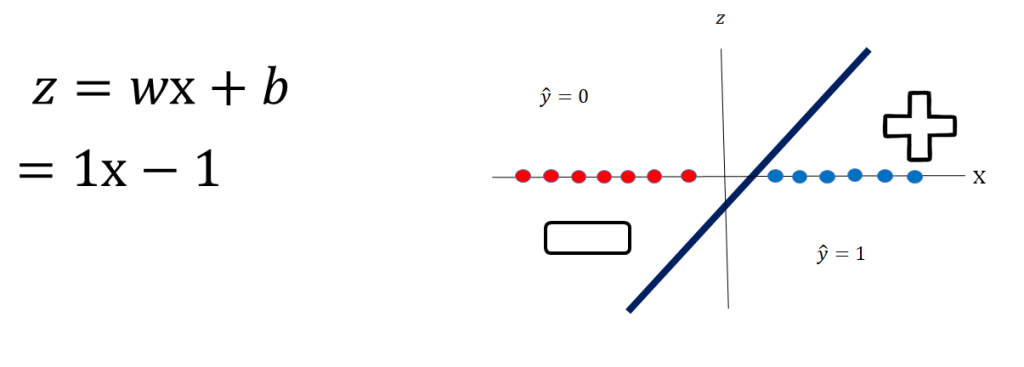
Let’s select the value of x to be 3. We plug it into the equation of our line and find that the value of z is 2. As shown in Figure 5:

Let’s try another example whit the red class ie y=0, Let’s say we choose the value of x to be -2. We plug it into the equation of our line and find that the value of Z is -3 as shown in figer 6.

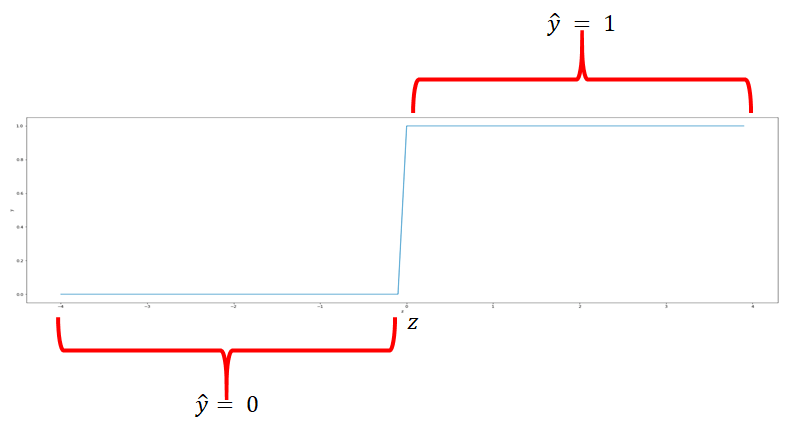
If we use this line to calculate the class of the points it always returns real numbers such as -1, 3, -2, and so on. But we need a class between 0 and 1. So how do we convert these numbers? We’ll use something called the threshold function. If z is greater than 0, the threshold function will return a 1, and if z is less than 0, the threshold will return a 0. The is shown if figure 7. Let’s see how the threshold function works in concert with the the line.
Combining the threshold function if we plug in the value of x as 3 ; the value of z is 2, this is shown in figure 8. The value of z equals to 2; this is passed on to the threshold function as show on the top of figure 7, the result is 
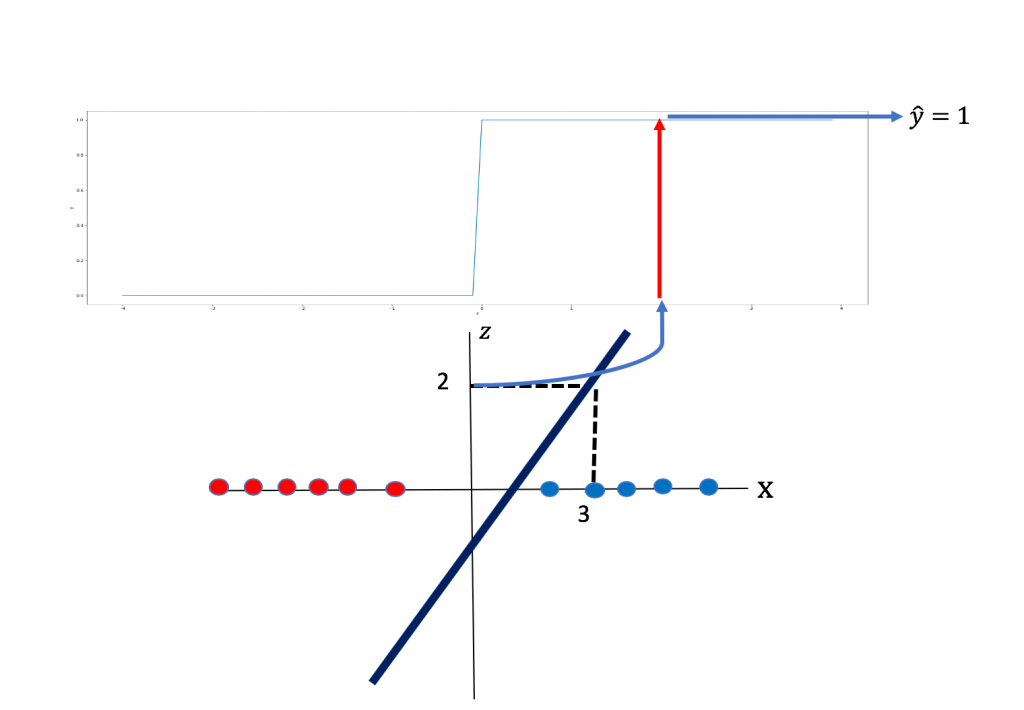 to be 1.
Similarly, If we plug in the value of x as -2, the value of z is -3. We pass through the threshold function and we get a 0. This is shown in figer 9:
 to be 0 .
Logistic Regression
Now let’s talk about logistic regression. The logistic function resembles the threshold function. The logistic function expression and the plot of the logistic function is shown in figure 10. The logistic function provides a measure of how likely a sample belongs to another class, in addition It has better performance then the threshold function for reasons we will discuss in another post . If the value of z is a very large negative number the value for the logistic function is approximately 0. For a very large positive value of z the value for the logistic function is approximately 1. And for everything in the middle the value is between 0 and 1 .

To determine
 to be 1.
Similarly, If we plug in the value of x as -2 the value of z is -3. We pass the value of z through the sigmoid function we see the result is less than 0.5 so we set
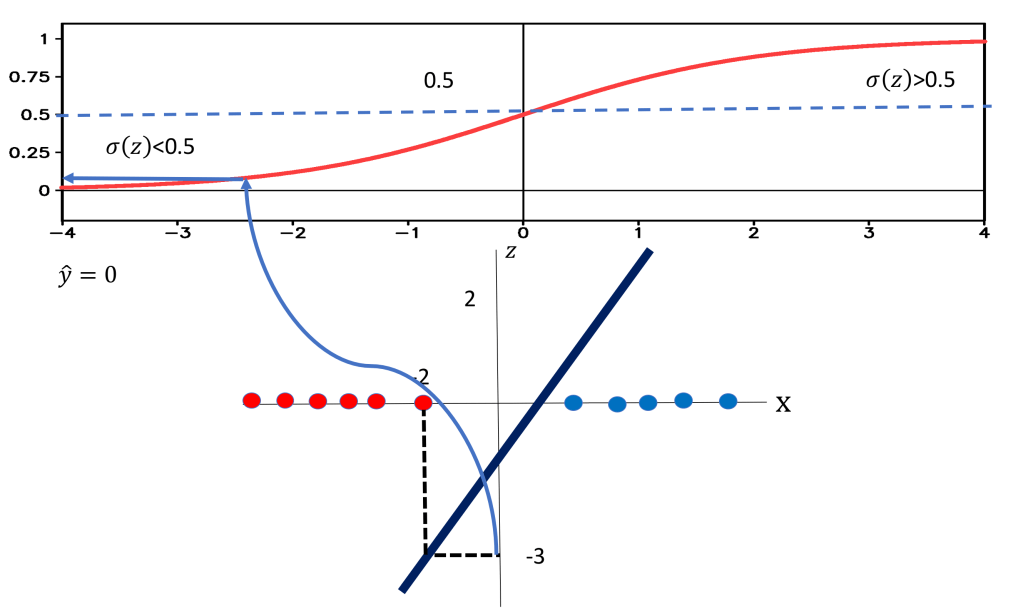 to be 0 .
The output of the logistic function can provide a means of determining how confident you are about the classification. If the points are very close to the center of the separating line the value for the sigmoid function is very close to 0.5, this means that we are not certain if the class is correct. If the points are far away the value for the sigmoid function is either 0 or 1, respectively this means we are certain about the class. This is shown in figure 12 the points x1 and x2 are not close to the separating line a small change in either will cause them to change their class; as a result we our uncertain about the true class of the sample and the output of the sigmoid function is near 0.5 as shown in the first two rows of the table . Conversely x3 and x4 are relatively far away from the separating line as such the sigmoid function is near zero or one.

Linear classifiers can be used for classifying samples in any dimension, lets look at the 2Dcase . Instead of a line to classify samples, we use a plane or hyperplane, this is shown in figure 13. If we look at a bird’s eye view of the plane we can get a better understanding of how the plane separates the data.
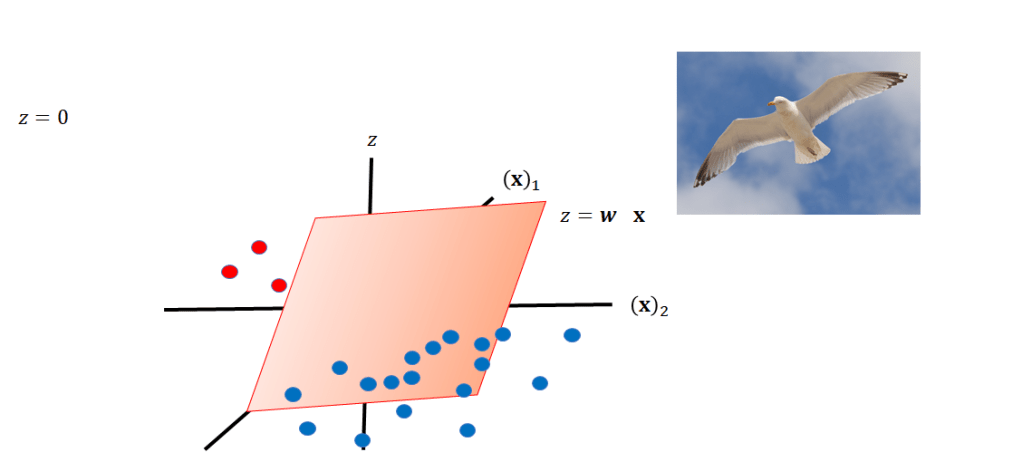
z equals 0, we can also see that as a line.We can visualize the plane at z = 0 as a line. This line can be used for separating the data, as shown in Fig 14.
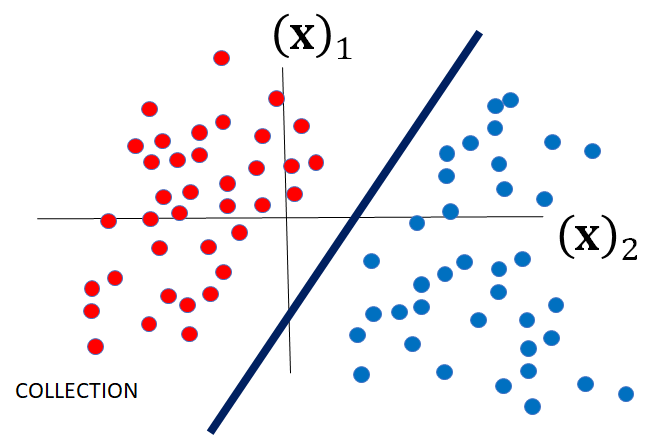
If you’re on one side of the plane you would get a negative value.Passing that into the threshold function Passing that into the threshold function you get a 0. as. shown in Fig . If you’re the other side of the plane, you would get a positive number, passing into the threshold function, you’ll get a one.

Now, lets use a logistic function then apply a threshold, first we can plug a negative value of z into the logistic function , if the value of the logistic function is less than 0.5 the output will
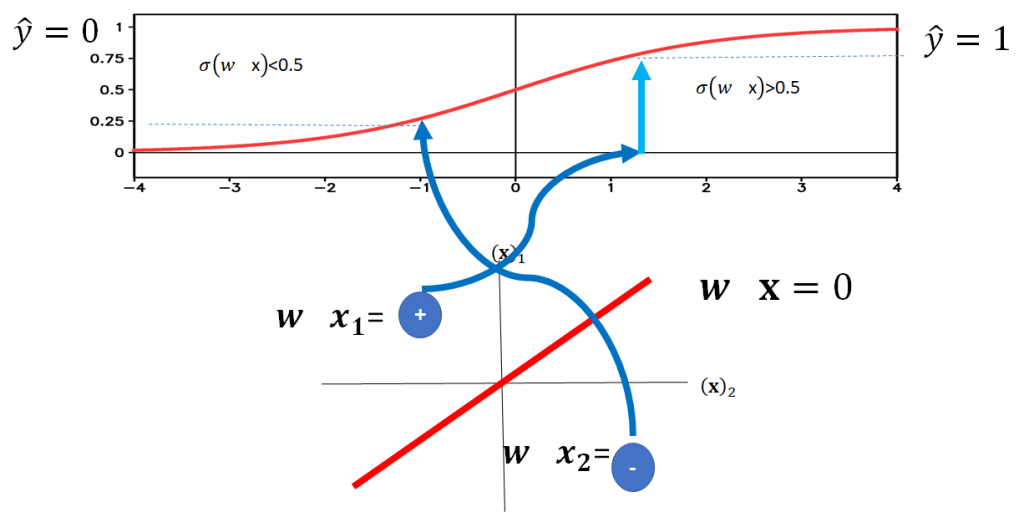
We can also represent the logistic function as a probability. Consider the point x1 the logistic function can be considered a conditional probability that 


this is shown in Fig 17, as the point in on the side of the plane where 

.
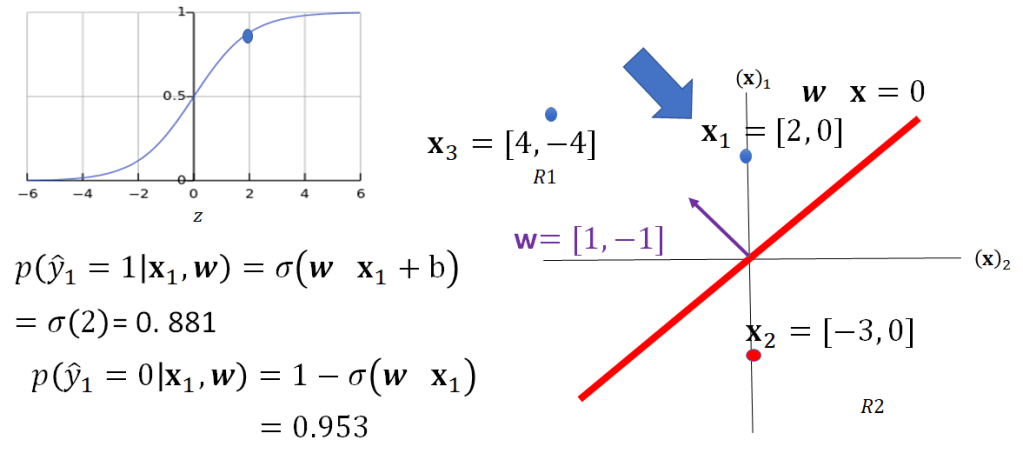
Similarly, we can calculate the value for x2 this is shown in Fig 18, in this case because x2 is on the other side of the plane corresponding to 
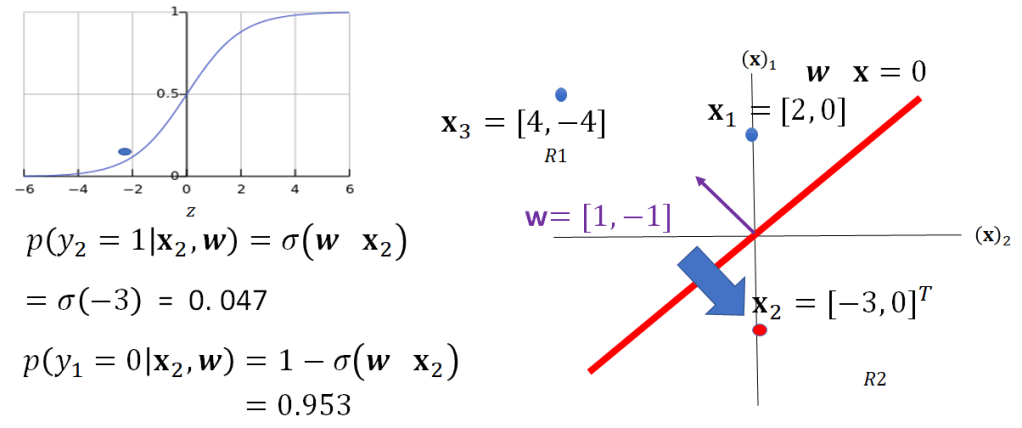
fig 18
To train linear classifiers we use Gradient Descent an optimization algorithm for finding a local minimum, in this case the minimum related to the number of misclassified samples, but this another story.
 Deepandmachinelearning.com/
Leave a comment